
Colors
Advanced WordPress Dark Mode Color Customization
Achieve a polished, professional look with full color customization using Darkify. Adjust background tones, text colors, button styles, borders, and more — all without writing a single line of code. Whether you’re aligning your site with your brand or enhancing readability, Darkify gives you complete visual control for a seamless dark mode experience.
wp-admin — Darkify · Colors
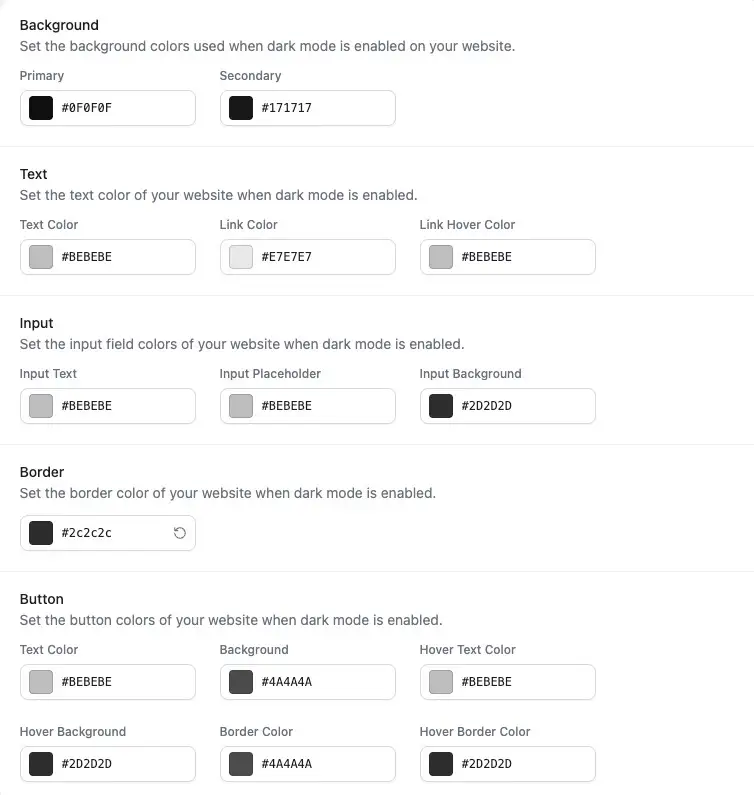
Start with a preset or customize every detail
Eleven hand-tuned dark palettes, then full control over every individual color.

Pre-Designed Presets
Apply a professionally crafted dark mode palette to your WordPress site instantly. With WordPress Dark Mode Color Customization, you get fast, beautiful results in just one click.
Custom Background Colors
Define your primary and secondary background colors to align with your brand’s identity. Achieve a cohesive design with full control through Darkify’s dark mode color customization options.
Text Color Control
Customize body text, link colors, and hover states to ensure maximum readability and accessibility in dark mode. Perfect for maintaining visual clarity and user trust.
Input Field Customization
PRO
Set background, text, and placeholder colors for input fields using WordPress Dark Mode Color Customization. Provide users with a smooth, branded experience in forms and search bars.
Border Color Management
PRO
Fine-tune the color of borders across your entire site. Whether for cards, containers, or form fields, Darkify ensures consistent styling in both light and dark themes.
Button Color Customization
PRO
Easily match button backgrounds and text colors to your theme. Use Darkify’s powerful customization tools to create bold, consistent calls to action across your site.
Customize your dark mode scrollbars
The small detail most dark themes forget — track and thumb, matched to your palette.
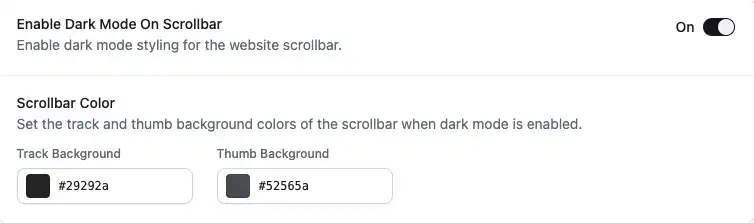
Enable Dark Mode on Scrollbars
With WordPress Dark Mode Color Customization, you can apply dark styling to your site’s scrollbars for a fully unified and modern appearance that matches the rest of your theme.
Scrollbar Track and Thumb Colors
PRO
Customize both the scrollbar track and thumb colors to align perfectly with your dark mode design. Fine-tune these details for a cohesive, branded visual experience.
Enhanced User Experience
PRO
Provide visitors with a smoother, more polished scrolling interaction. Styled scrollbars reinforce your branding and enhance usability across all devices and screen sizes.
WordPress Dark Mode Color Customization FAQs
Answers are drafted — replace with your live Colors FAQ copy before publishing.