

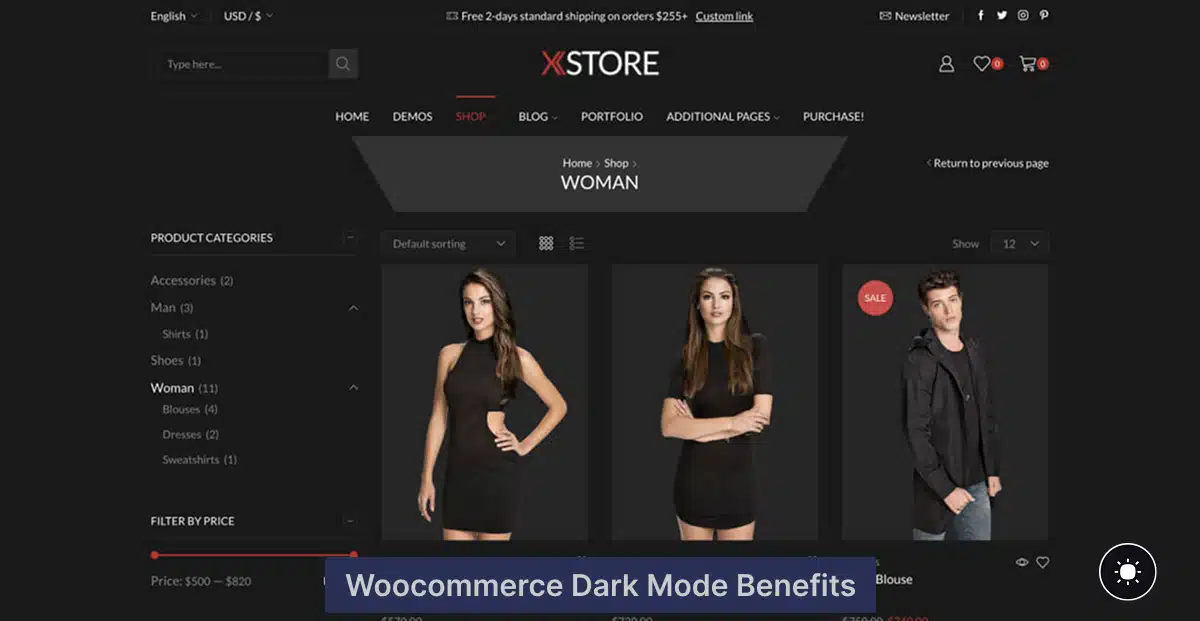

WooCommerce Dark Mode Benefits: Why This Matters in 2026
WooCommerce dark mode benefits go far beyond aesthetics. Dark mode is no longer just a design trend — in 2026, it’s a proven conversion booster that directly impacts how shoppers browse, engage, and buy from online stores.
If you’re running a store and haven’t added dark mode in WooCommerce yet, you’re likely missing an opportunity to improve user comfort, reduce visual fatigue, and keep customers on your site longer. Modern shoppers expect smooth, visually comfortable interfaces — especially when browsing products late at night or on mobile devices.
As the world’s most popular eCommerce platform, WooCommerce powers millions of online stores. But while the platform excels at flexibility and scalability, it doesn’t include dark mode by default. That’s where understanding the real WooCommerce dark mode benefits becomes critical for store owners who want to stay competitive in 2026.
The good news? You don’t need complex code or risky CSS hacks. With the Darkify plugin, you can enable a fully customizable dark mode for your WooCommerce store in just a few clicks — giving shoppers the modern, eye-friendly experience they now expect, without sacrificing performance or design control.
Table of Contents
What Is Dark Mode and Why WooCommerce Dark Mode Benefits Are Trending in 2026
Dark mode is a design approach that uses dark backgrounds paired with light text to create stronger contrast and a more comfortable viewing experience. Instead of bright white screens, users interact with softer, darker tones that reduce glare and visual fatigue.
So why is this everywhere in 2026—and why are WooCommerce dark mode benefits getting so much attention?
Why Dark Mode Matters
- Improves readability and reduces eye strain: Dark backgrounds minimize harsh light, making it easier for shoppers to browse products for longer periods—especially at night or in low-light environments.
- Looks sleek and professional: Dark mode instantly gives WooCommerce stores a modern, premium feel that customers now associate with high-quality brands.
- Saves battery life on OLED devices: On smartphones and tablets, dark pixels consume less power, which is ideal for mobile shoppers browsing on the go.
The trend isn’t just anecdotal. Over 80% of users prefer dark mode when it’s available, and many actively enable it across apps, operating systems, and websites.
For online stores, this has a direct impact on shopping behavior and user experience. When customers feel visually comfortable, they stay longer, explore more products, and experience less friction during the buying process. That’s one of the most important WooCommerce dark mode benefits—it quietly supports engagement and conversions without changing your products or pricing.
Reason #1: Better Shopping Experience & Accessibility
One of the most important WooCommerce dark mode benefits is the immediate improvement in shopping comfort. Dark mode creates an eye-friendly browsing environment that feels natural, modern, and easy to navigate—especially during longer shopping sessions.
When customers feel comfortable, they stay longer on your WooCommerce store. Reduced glare and softer contrast help prevent visual fatigue, which means shoppers are more likely to scroll through product pages, read descriptions, and explore related items instead of bouncing early.
Dark mode also significantly improves readability in low-light conditions, making it ideal for mobile users browsing at night or in dim environments. Since a large portion of WooCommerce traffic comes from smartphones, this directly enhances the mobile shopping experience.
Accessibility is another key advantage. For users with light sensitivity, migraines, or certain visual impairments, dark mode makes content easier to consume. By offering this option, your store becomes more inclusive—removing barriers that might otherwise prevent customers from completing a purchase.
In short, one of the biggest WooCommerce dark mode benefits is simple but powerful: shoppers feel better using your store—and when they feel better, they buy more.
Reason #2: Boosts Conversions & Reduces Bounce Rate
Another major WooCommerce dark mode benefit is its direct impact on conversions. When dark mode lowers eye fatigue, users naturally spend more time browsing—and time on site is one of the strongest indicators of purchase intent.
Bright interfaces can feel overwhelming during long sessions. Dark mode softens the visual experience, making it easier for shoppers to scroll through categories, compare products, and read reviews without discomfort. The result? Lower bounce rates and deeper engagement across your WooCommerce store.
Dark mode also elevates perception. Modern, elegant visuals inspire trust and professionalism, especially in competitive niches like fashion, tech, and digital products. Shoppers are more likely to trust a store that looks current, intentional, and thoughtfully designed.
There’s also a subtle psychological effect at play: dark backgrounds can make products appear more premium. Colors pop, images feel richer, and CTAs stand out more clearly—helping guide customers toward add-to-cart and checkout actions.
With the Darkify plugin, you can take this a step further by monitoring engagement improvements after enabling dark mode. Whether it’s longer sessions, more page views, or improved conversion paths, these measurable results reinforce why WooCommerce dark mode benefits translate directly into business growth.
Reason #3: Enhances Your Brand’s Modern Identity
One of the most strategic WooCommerce dark mode benefits is how it reshapes your brand’s perception. Today’s customers strongly associate dark mode with innovation, modern design, and forward-thinking brands. When your store offers dark mode, it signals that you care about user experience and stay current with digital trends.
Dark mode also adds a luxury, high-end feel to product pages. This is especially powerful for fashion, tech, and lifestyle WooCommerce stores, where presentation plays a huge role in perceived value. Dark backgrounds make product images stand out, typography feel more refined, and layouts look intentional rather than generic.
Leading platforms like Apple, Amazon, and YouTube have normalized dark mode across their interfaces. By offering a similar experience, your WooCommerce store feels instantly familiar and trustworthy to shoppers. This alignment with major UI trends helps reduce friction and increases confidence—both critical factors in online purchasing decisions.
In short, one of the often-overlooked WooCommerce dark mode benefits is brand positioning. Dark mode doesn’t just improve usability—it elevates how customers feel about your store before they ever click “Add to Cart.”
Reason #4: Optimized for Mobile Shopping
A major reason WooCommerce dark mode benefits matter in 2026 is simple: most WooCommerce traffic now comes from mobile devices. Shoppers browse products on their phones during commutes, late at night, or in low-light environments—and dark mode dramatically improves that experience.
Dark mode helps mobile users browse comfortably without harsh screen brightness, especially at night or indoors. This reduced glare makes scrolling through product listings, reading descriptions, and viewing images far easier on the eyes, which encourages longer browsing sessions.
There’s also a performance and efficiency advantage. On OLED and AMOLED screens, dark mode can reduce battery usage by up to 60%, which is a big win for mobile shoppers. When users don’t feel their battery draining, they’re more likely to continue browsing and complete purchases instead of abandoning the session.
With the Darkify plugin, your WooCommerce store automatically adapts to mobile displays. Dark mode toggles, color contrast, and layouts remain responsive across all screen sizes—ensuring that one of the most practical WooCommerce dark mode benefits delivers real value to mobile-first customers.
Reason #5: Easy to Enable with Darkify Plugin
One of the most practical WooCommerce dark mode benefits is that it’s no longer difficult or risky to implement. While WooCommerce itself doesn’t include built-in dark mode, trying to add it manually often creates more problems than it solves.
Many store owners attempt CSS hacks or custom scripts, only to run into issues like:
- Broken layouts after theme or WooCommerce updates
- Inconsistent styling across product pages
- Slower performance due to bloated code
- No reliable toggle for users
This is where Darkify becomes the smartest solution.
Why Darkify Makes Dark Mode Simple
Darkify is built specifically to add dark mode to WordPress and WooCommerce without breaking performance or design. It offers:
- ⚡ One-click activation — enable dark mode instantly
- 🎨 Custom color palettes — match dark mode perfectly to your brand
- 🚫 Exclusion options — disable dark mode on checkout, cart, or specific pages
- 📱 Fully responsive design — seamless experience on desktop, tablet, and mobile
- 🚀 Lightweight & Core Web Vitals–friendly — no negative impact on speed
Instead of fighting with custom code, Darkify lets you unlock all the WooCommerce dark mode benefits safely, quickly, and professionally—making it one of the easiest UX upgrades you can apply to your store in 2026.
How to Add Dark Mode in WooCommerce (Quick Steps)
Now that you understand the key WooCommerce dark mode benefits, here’s how to enable it on your store in just a few minutes using Darkify:
- Install and Activate the Darkify Plugin
– From your WordPress dashboard, go to Plugins → Add New, search for Darkify, then install and activate it. - Go to Darkify Settings
– Navigate to Dashboard → Darkify → Settings to access all dark mode options. - Enable the Dark Mode Toggle
– Turn on the Dark Mode Toggle to activate dark mode across your WooCommerce store. - Customize Button Placement and Colors
– Choose where the toggle appears (floating, header, corner).
– Adjust background, text, and accent colors to match your brand. - Save and Test Your Store
– Save your settings and preview your store in both light and dark modes.
– Test on desktop and mobile to ensure everything looks perfect.
That’s it. With just a few clicks, you unlock all the WooCommerce dark mode benefits—better UX, improved engagement, and a modern shopping experience your customers expect in 2026.
Final Thoughts
At this point, the value is clear: WooCommerce dark mode benefits go far beyond visual appeal. Dark mode improves user experience, keeps shoppers engaged longer, reduces eye strain, and helps position your store as modern and trustworthy. All of these factors quietly work together to support higher conversions and stronger brand perception.
The best part? Adding dark mode to WooCommerce is easy, fast, and completely compatible with your existing setup. You don’t need custom code, risky CSS tweaks, or complex configurations. With the right tool, it’s a smooth upgrade that delivers real results.
That’s why Darkify is the recommended solution. You can start with Darkify Free to enable dark mode instantly, then upgrade to Darkify Pro when you’re ready for advanced customization, color control, and page-level exclusions.
FAQs About WooCommerce Dark Mode Benefits
Does WooCommerce have dark mode built-in?
No. WooCommerce does not include a built-in dark mode feature. To enable dark mode functionality, you’ll need a dedicated plugin like Darkify, which adds a user-friendly toggle and full customization options.
Will Darkify slow down my WooCommerce store?
Not at all. Darkify is lightweight and optimized for performance, including Core Web Vitals. It doesn’t add unnecessary scripts or bloat, so you get all the WooCommerce dark mode benefits without sacrificing speed.
Can I customize dark mode colors for product pages?
Yes. Darkify allows you to customize background, text, and accent colors, so your product pages remain readable, on-brand, and visually appealing in dark mode.
Can I disable dark mode on checkout?
Absolutely. One of the most practical WooCommerce dark mode benefits is control. Darkify lets you exclude specific pages like checkout, cart, or landing pages to avoid any UX conflicts.
Is Darkify free or paid?
Both. Darkify Free gives you essential dark mode functionality, while Darkify Pro unlocks advanced features like enhanced styling, toggle customization, and page-level exclusions.