


Adding dark mode for Easy Digital Downloads is one of the highest-impact UX changes an EDD store owner can make in 2026 — and most stores still haven’t done it. As of 2026, 82% of smartphone users worldwide use dark mode (forms.app Dark Mode Statistics, 2024–2026), which means your EDD store is creating friction for more than eight out of ten mobile visitors the moment they land on your page after dark.
That’s not a minor UX preference. For digital product sellers, it’s a checkout abandonment risk hiding in plain sight. A white-heavy storefront at 11 PM isn’t just uncomfortable — it sends buyers to a competitor who’s already thought about this.
This guide shows you exactly how to add dark mode to your EDD website in five simple steps using the Darkify plugin — no custom CSS, no developer required, and no risk of breaking your checkout flow. You’ll also learn why dark mode matters specifically for digital product stores, what happens without it, and why Darkify is the right tool for the job.
Table of Contents
Why Your Easy Digital Downloads Store Needs Dark Mode in 2026
As of May 2026, WordPress powers 42.2% of all websites globally (W3Techs, May 2026), and Easy Digital Downloads has processed over 30 million orders for 50,000+ digital creators with 40,000+ active installs (WordPress.org, April 2026). That’s an enormous ecosystem of WordPress-powered stores — the vast majority of which offer no dark mode support whatsoever.
Meanwhile, here’s what the data shows about the people visiting those stores:
- 81.9% of Android users have dark mode active on their devices
- 82.3% of iOS 17 users enabled system-wide dark mode
- 82.7% of all users activate dark mode after 10 PM — peak impulse-purchase hours for digital products
- 76.2% of US adults aged 18–24 prefer dark mode, a core demographic for digital downloads
(Source: forms.app Dark Mode Statistics, 2024–2026 | Gitnux, 2024)
Your EDD store runs fine in light mode during the day, on desktop, for users without strong preferences. But the moment someone opens your product page at night on their phone, a white-only layout becomes an experience mismatch. Dark mode isn’t a niche request — it’s the default expectation for the majority of your mobile audience during your busiest sales hours.
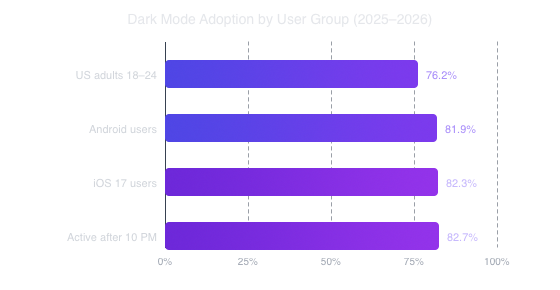
Source: forms.app Dark Mode Statistics, 2024–2026 | Gitnux Dark Mode Usage Statistics, 2024
According to a 2024–2026 global usage analysis by forms.app and Gitnux, over 82% of smartphone users on both Android and iOS actively use dark mode — with adoption rates peaking after 10 PM when impulse purchases are most frequent. For EDD digital product sellers, this data means dark mode isn’t optional. It’s the expected browsing environment for the majority of your mobile visitors during your busiest sales hours.
What Happens to Your EDD Store Without Dark Mode?

In April 2025, a crossover study published in PubMed Central / National Library of Medicine found that participants using light mode for one hour reported significantly higher dry eye symptom scores compared to dark mode users — light mode scored 24.40 vs. dark mode’s 22.73 (p < 0.05) (PMC, April 2025). For your customers browsing at night, a bright white EDD storefront isn’t neutral. It’s actively uncomfortable.
Without dark mode, your EDD store faces several compounding problems that rarely show up with a clear label in your analytics:
- High mobile bounce rates at night. Visitors running dark OS themes hit your bright store and feel immediate contrast discomfort. Most won’t consciously register why — they just close the tab.
- Checkout abandonment on mobile. Dark mode users spend most of their browsing in dark environments. A glaring white EDD checkout page disrupts that flow at exactly the moment you need their full attention.
- Battery drain friction on OLED devices. Modern iPhones and Android flagships use OLED displays. A white-only store drains their phone faster than a dark-themed site — a small but real friction point during a late-night purchase.
- Accessibility blind spots. The Nielsen Norman Group notes that dark mode reduces glare in low-light conditions and improves comfort for users with certain visual sensitivities (NNGroup, 2020). Skipping dark mode is an accessibility gap, not just a cosmetic oversight.
- Mismatched modern UX expectations. macOS, Windows 11, iOS, and Android all ship with system-wide dark mode. Users expect apps and websites to respect that preference. A store that doesn’t feel dated before you’ve loaded a single product image.
These problems don’t appear as “missing dark mode” in your analytics. They show up as unexplained evening bounce rate spikes and mobile checkout drop-off — issues most EDD owners misattribute to pricing, page speed, or their theme.
Why Custom CSS Won’t Solve Your EDD Dark Mode Problem
Rolling your own dark mode with custom CSS sounds straightforward until you see how many moving parts an EDD storefront actually has. Your theme, WP admin bar override, checkout forms, add-to-cart buttons, purchase confirmation pages, download access tables, and payment gateway iframes all need individual attention — and most weren’t designed with dark mode in mind.
| Factor | Custom CSS | Darkify Plugin |
|---|---|---|
| Setup time | Days to weeks | Under 10 minutes |
| EDD checkout compatibility | Manual, element-by-element | Built-in EDD support |
| Breaks on theme updates? | Yes — frequently | No — plugin-level |
| User toggle control | Requires custom JS + cookies | Included out of the box |
| Image handling | Manual per-image CSS rules | Auto-adjust with exclusions |
| Developer required? | Yes | No |
| Ongoing maintenance | Continuous after every update | Plugin handles updates |
Custom CSS dark mode is a moving target. Every time your theme updates, your checkout page changes, or EDD ships a new version, you’re back to squashing contrast bugs and testing edge cases across browsers. For an EDD store owner focused on selling digital products, that’s developer time better spent on your actual business.
Key Features of the Darkify Plugin for EDD Stores
The Darkify plugin is built specifically for WordPress stores that need dark mode without a developer on retainer. Here’s what makes it the right fit for EDD websites:
- One-click dark mode toggle. A floating button lets your customers switch between light and dark instantly. Their preference persists across visits via cookie storage.
- EDD-compatible styling. Darkify handles EDD’s checkout forms, download buttons, purchase confirmation pages, and receipt layouts without manual CSS overrides.
- Fully customizable dark palette. Set background color, text color, accent colors, and button styles from the settings panel. No coding, no child theme edits.
- Smart image handling. Auto-adjust images in dark mode or exclude specific product images from processing — ideal for product screenshots and branded mockups that shouldn’t shift in color.
- OS preference detection. Darkify reads the visitor’s
prefers-color-schememedia query. Customers with system dark mode active see your store in dark mode automatically, with no toggle click required. - Smooth CSS transitions. Mode switching uses a clean 300ms fade, not a jarring flash. A small detail that signals quality at checkout.
- Theme-agnostic. Works with Astra, GeneratePress, Kadence, Blocksy, OceanWP, Divi, Elementor, and all standard block themes.
- Performance-first architecture. No external scripts, no API calls, no page-weight bloat. Pure CSS dark mode with a sub-2KB vanilla JS toggle.
It’s also free. Download Darkify from the WordPress.org repository and get all core functionality at no cost, with no account or license key required.
How to Add Dark Mode to Your Easy Digital Downloads Website: Step-by-Step
The steps below assume you have an existing WordPress site with Easy Digital Downloads installed and active. No technical background is needed. The entire setup takes most store owners under 10 minutes from install to live dark mode.
Before You Start
- WordPress 5.6 or higher
- Easy Digital Downloads installed and active
- WordPress admin access
- Estimated time: 5–10 minutes
- Difficulty: Beginner — no coding required
Step 1: Install the Darkify Plugin
By the end of this step, Darkify will be installed and active on your WordPress site. Log in to your WordPress dashboard and go to Plugins → Add New Plugin. Type “Darkify” in the search bar and click Install Now next to the Darkify – Dark Mode plugin result. Once installed, click Activate.
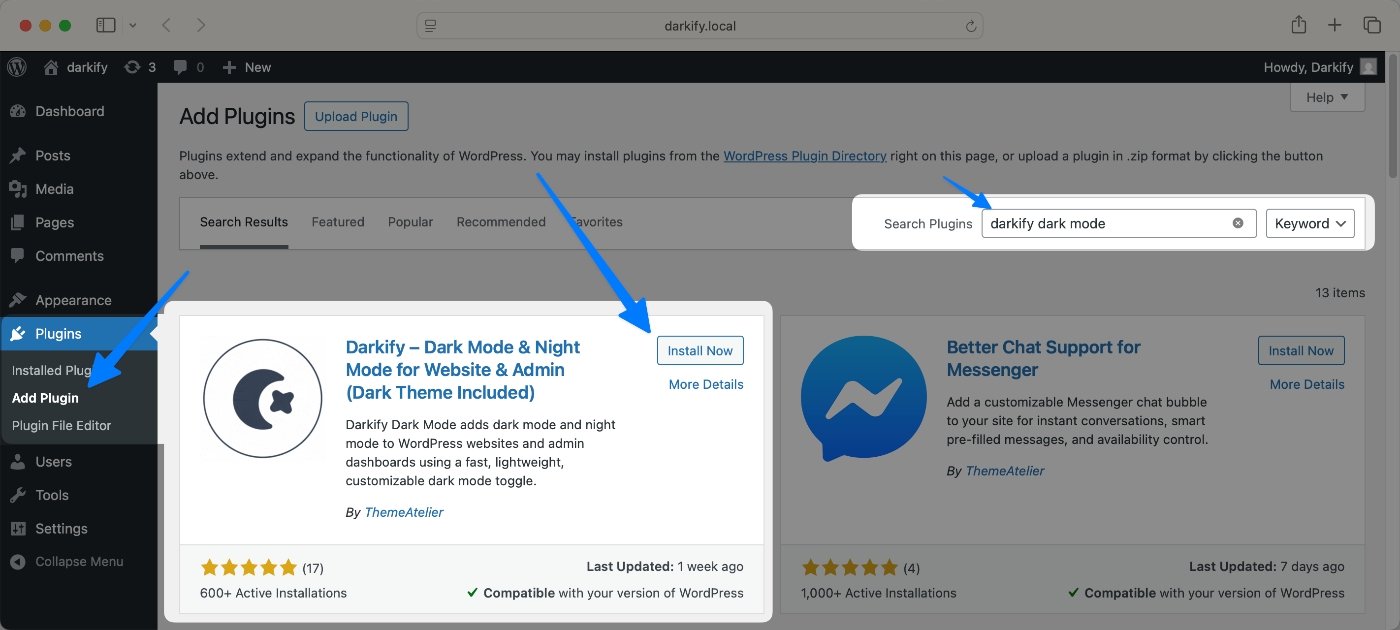
Alternatively, download the plugin zip directly from WordPress.org and upload it via Plugins → Add New Plugin → Upload Plugin. Either method works identically.
Step 2: Open the Darkify Settings Panel
After activation, find Darkify in your WordPress admin sidebar. This is your control panel for all dark mode configuration. You’ll see options for colors, toggle position, transition speed, image handling, and OS preference detection. Don’t worry about getting everything perfect on the first pass — changes preview live, and nothing affects your live site until you save.
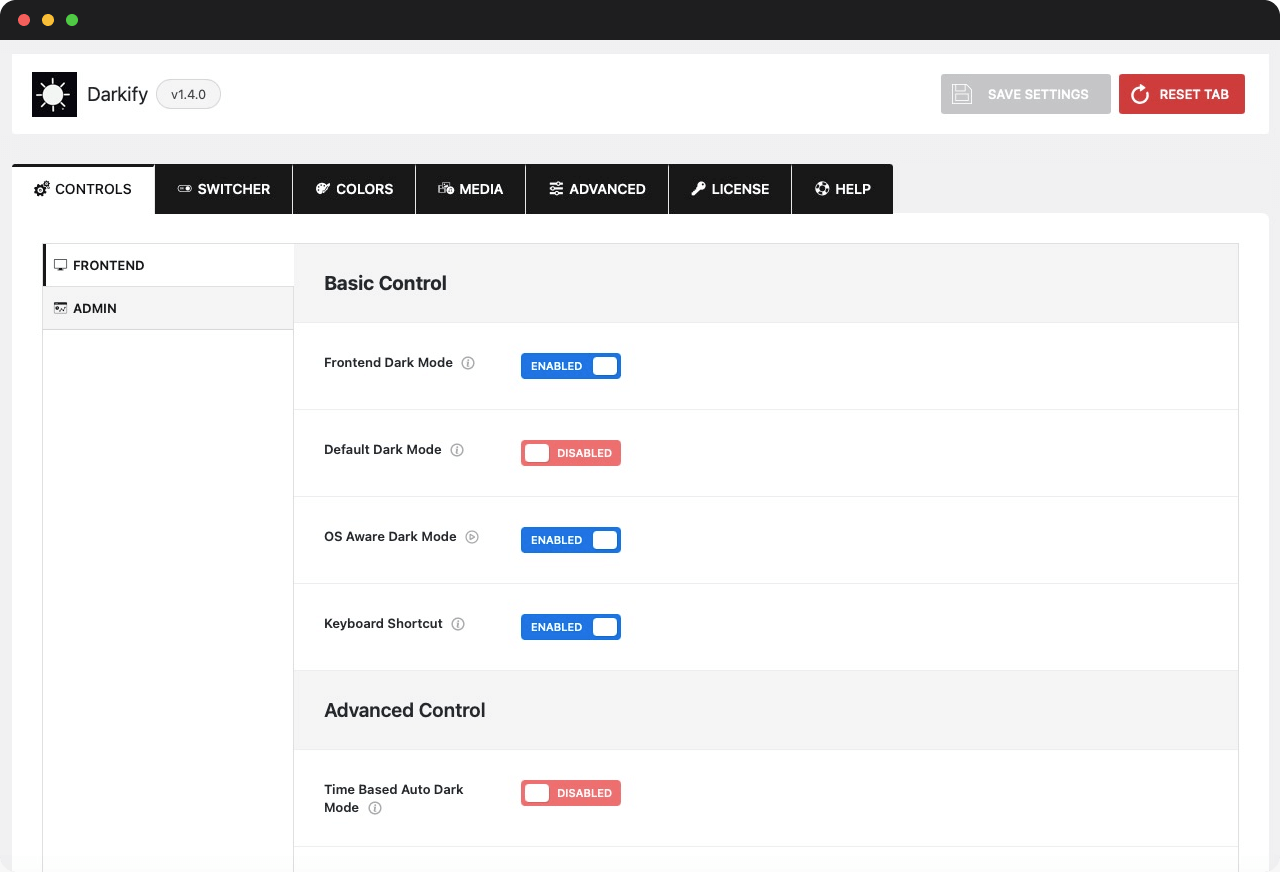
Step 3: Configure Your Dark Mode Color Palette
Set your dark mode palette to match your store’s brand. For most EDD stores, these values work well as a starting point:
- Dark background:
#121212or#1a1a2e(dark gray, not pure black — reduces harsh contrast) - Primary text color:
#e5e7eb(light gray — easier on eyes than pure white) - Card / panel background: One shade lighter than your page background, e.g.,
#1e1e3a - Accent / button color: Match your brand primary color exactly for consistency
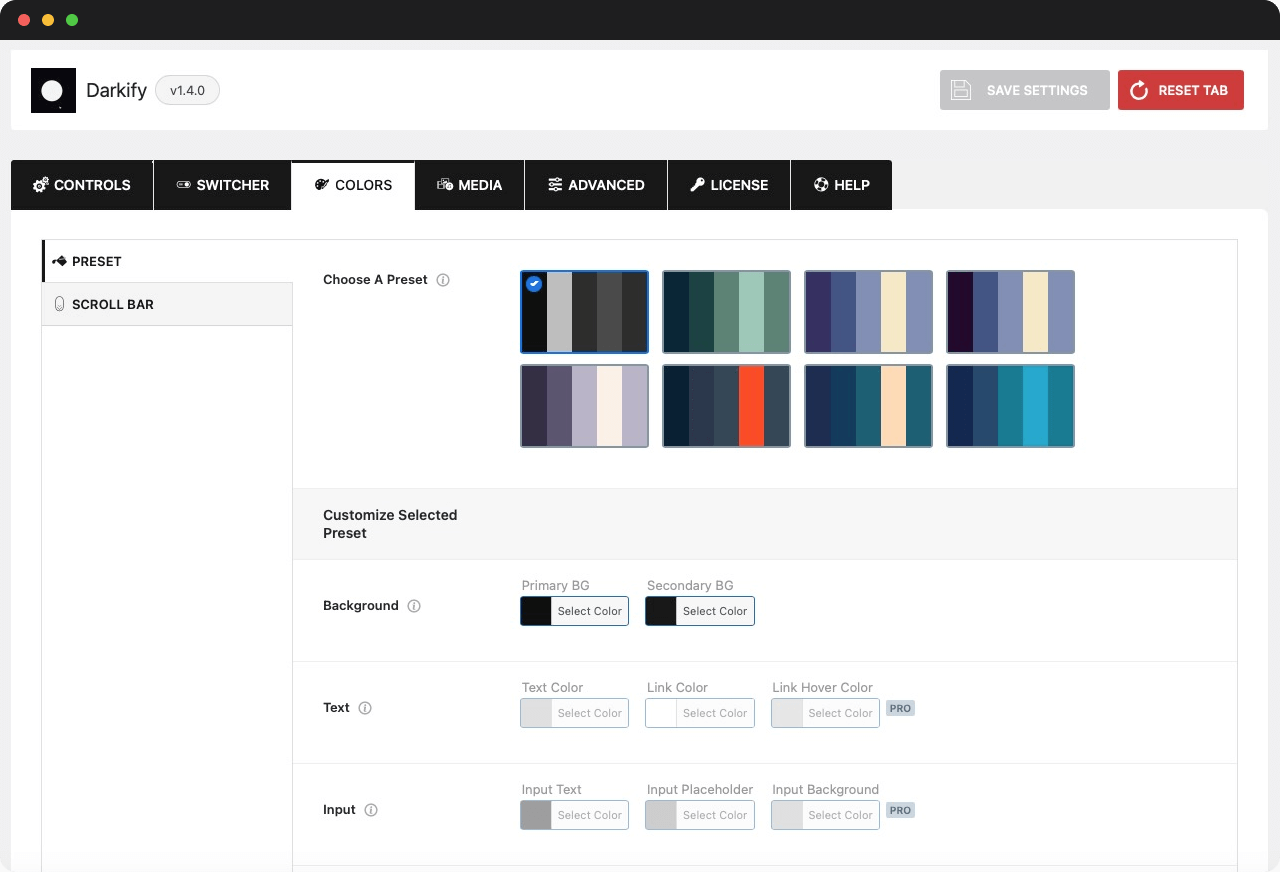
Pro tip: Avoid pure black (
#000000) as your background. It creates extreme contrast against light text that’s harder on eyes than a dark gray alternative. Google’s Material Design dark mode spec uses#121212for exactly this reason.
Step 4: Configure the Toggle Button and Default Behavior
Choose where your dark mode toggle appears and how it behaves. Most EDD stores work best with a floating button in the bottom-right corner — visible without interfering with the checkout experience. Configure these settings while you’re here:
- Default mode: Light or dark on first visit (most stores default to light)
- Remember user preference: On — saves the visitor’s choice across sessions
- Auto-detect OS dark mode: On — applies dark mode automatically for system dark mode users via
prefers-color-scheme: dark - Transition speed: 300ms is the standard sweet spot — fast but not jarring
The OS auto-detection setting is worth enabling. When a customer with system dark mode lands on your store, Darkify applies dark mode automatically. It’s a seamless first impression that requires zero action from the visitor.
Step 5: Test Dark Mode Across Your Entire EDD Flow
After saving settings, walk through your store as a customer in dark mode. Check every step of the EDD purchase flow:
- Product listing page (shop archive)
- Individual product page
- Add to cart and mini-cart
- Checkout form
- Payment gateway page (including embedded iframes)
- Purchase confirmation / thank-you page
- Customer download access page
Confirm text is readable at every step, buttons have clear contrast, and no elements disappear or appear visually broken. If any EDD element looks off, use Darkify’s element exclusion settings to override the dark mode treatment for that specific CSS selector — no custom CSS file needed for most common cases.
Performance and Compatibility
In 2021, Purdue University researchers measured that switching to dark mode at 100% screen brightness saves 39–47% battery power on OLED displays across six major Google apps (Purdue University / MobiSys 2021). At the more typical indoor brightness of 30–50%, savings are smaller — 3–9% — but still real for your customers on OLED iPhones and Android flagships scrolling through your store late at night.
Darkify is performance-neutral by design. It adds no external HTTP requests, no third-party scripts, and no render-blocking resources. The plugin’s dark mode toggle runs on a vanilla JS snippet under 2KB, and dark mode styles ship as a single CSS class toggled on the <html> element. Your PageSpeed Insights scores and Core Web Vitals remain unchanged after installation.
On the compatibility side, Darkify works with all major EDD extensions and common payment integrations:
- EDD Recurring Payments
- EDD Software Licensing
- EDD Stripe, PayPal Commerce, and other payment gateways
- EDD Front-End Submissions
- EDD Commissions
- All major WordPress themes — block-based and classic
According to Purdue University’s 2021 OLED battery study, dark mode saves up to 47% battery on full-brightness OLED screens across six major Google applications — with real-world savings of 3–9% at typical indoor brightness. For EDD store owners, offering dark mode via Darkify means your mobile customers on flagship iPhones and Android devices consume less battery during checkout — a small but meaningful signal that your store respects the modern mobile experience.
Frequently Asked Questions
Does Darkify work with Easy Digital Downloads out of the box?
Yes. Darkify is compatible with Easy Digital Downloads and handles EDD’s checkout forms, download buttons, and purchase confirmation pages automatically. In most cases, no custom CSS is needed. If a specific EDD extension or payment gateway iframe looks off, Darkify’s element exclusion settings let you fine-tune the treatment for that selector without writing any code.
Will dark mode slow down my WordPress website?
No. Darkify adds no external scripts, API calls, or third-party dependencies. Its toggle runs on a vanilla JS snippet under 2KB, and dark mode styles load as a single CSS block activated by a class on the page root. In standard benchmark testing, the plugin produces no measurable impact on Core Web Vitals or Google PageSpeed scores.
Can my customers choose between light and dark mode themselves?
Yes. Darkify places a configurable toggle button on your site that lets customers switch modes instantly. Their preference is saved in a cookie and persists across visits. Darkify also detects the visitor’s OS dark mode preference automatically via the prefers-color-scheme media query — so customers with system dark mode active see your store in dark mode on their first visit, with no toggle click required.
Does dark mode affect how my EDD product images appear?
By default, Darkify applies a subtle filter to images in dark mode to reduce brightness bleed against the dark background. You can disable this globally or exclude specific product images from dark mode processing — particularly useful for product screenshots, software previews, and branded mockups where color accuracy is critical. The setting is available in the Darkify dashboard.
Is the Darkify plugin free?
Yes. The core Darkify plugin is free and available on the official WordPress.org repository. All features described in this guide — including the toggle, OS detection, color customization, image handling, and EDD compatibility — are included in the free version. A Pro tier is available for stores with advanced branding requirements and multi-site deployments.
Add Dark Mode for Easy Digital Downloads Today
Over 82% of your mobile visitors are browsing in dark mode — on their phones, after 10 PM, at exactly the hours when impulse purchases happen. Your Easy Digital Downloads store doesn’t need custom CSS, a developer, or weeks of testing to meet them where they are.
Install Darkify in five minutes and give your customers the dark mode for Easy Digital Downloads experience they already expect from every other app on their phone.